
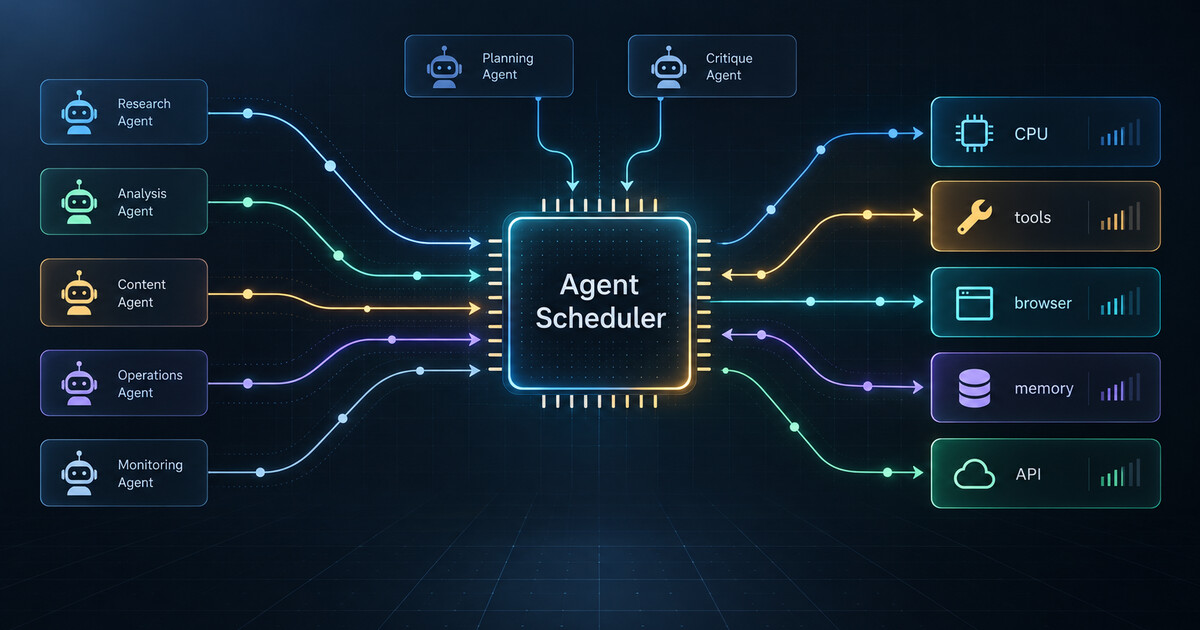
The easiest way to put an AI agent into production is to give it a queue.
A user asks for work. The app writes a job. A worker picks it up, calls a model, opens a browser or a tool container, retries a few times, and eventually returns an answer. For the first demo, that is enough. For one user, one task type, and one happy path, the queue feels like infrastructure.
Then the second workflow arrives. Then a coding agent, a research agent, a support agent, and a data-cleanup agent all share the same pool of tools. Browser sessions start hanging. Local containers fight for CPU. Vector searches look cheap until ten agents run them at once. A faster model reduces one part of the latency curve while making tool contention more visible. Someone adds more workers, and the system gets less predictable.
That is the moment when a queue stops being an architecture. It is only a starting line.
A new arXiv paper, “Not All AI Agents Are Equal: Characterizing Resource and Performance Dynamics,” puts useful measurements behind a problem many teams are already feeling. The authors study LLM-based agents across retrieval-augmented question answering, web search, and software coding. Their core finding is straightforward but operationally important: agent tasks do not consume resources in the same way. Even the same tool can behave differently depending on the task around it. Concurrent execution exposes CPU, disk I/O, and memory bottlenecks. Faster LLM responses or more CPU cores do not automatically make the whole agent faster.
That should change how teams think about agent infrastructure.
A queue answers one question: what should run next? A scheduler answers a harder set of questions: what should be allowed to run now, with which tools, under which budget, and with what evidence that the decision improved the system?
For ordinary background jobs, that distinction may be academic. For AI agents, it becomes practical very quickly because an agent run is not a single unit of work. It is a sequence of phases. The model plans. The agent retrieves context. It calls tools. It may spin up a browser, query a database, write a file, run tests, ask for approval, retry after an error, or branch into a subtask. Each phase has a different resource shape.
A support-summary agent may spend most of its time waiting on remote APIs. A coding agent may become CPU-heavy when running tests. A browser agent may bottleneck on session slots and page loads. A research agent may look cheap until it starts crawling pages and reranking documents. Treating all of those as identical jobs hides the real constraint.
The answer is not to build a giant orchestration platform on day one. Anthropic’s guidance on building effective agents is a useful counterweight here: simple, composable workflows are usually better than clever abstractions. The right pattern is a small scheduler that grows from measured friction.
Start with labels. Every agent task should declare a rough resource profile before it runs: model-heavy, CPU-heavy, browser-heavy, retrieval-heavy, write-capable, approval-gated, or external-API-heavy. The labels do not need to be perfect. They need to be explicit enough that the runtime can stop pretending every job is the same.
Then add tool admission gates. If browser sessions are scarce, do not let every queued job enter its browser phase at the same time. If local test runs saturate CPU, admit only a few coding-agent test phases concurrently. If a vendor API has tight rate limits, make that limit visible to the scheduler instead of discovering it through failures. The goal is not lower concurrency everywhere. The goal is the right concurrency for each constrained phase.
Next, attach budgets to the run. A production agent should know its maximum model spend, maximum wall-clock time, retry budget, tool-call budget, and escalation threshold. Those budgets should be enforced by the runtime, not merely suggested in the prompt. When a task exceeds its budget, the scheduler should pause, degrade, reroute, or escalate rather than allowing an agent to wander until a human notices the bill or the backlog.
Finally, make the scheduler observable. OpenAI’s Agents SDK includes tracing documentation, and OpenTelemetry’s GenAI semantic-convention work shows the broader ecosystem moving toward portable telemetry for model calls, agent spans, events, metrics, exceptions, and tool activity. That direction matters because scheduling without traces is just guessing with confidence.
A useful trace should connect the decision to the outcome. The scheduler admitted this browser phase at this time. It delayed that CPU-heavy test run because the pool was saturated. It cut off a retry loop after three failed tool calls. It routed a retrieval-heavy job to a worker with lower disk pressure. Then the trace should show whether latency improved, whether error rates fell, and whether downstream users actually received better service.
This is where many agent deployments are still too prompt-centered. They record the conversation and maybe the final answer, but they do not record enough about the runtime. The prompt can explain what the agent hoped to do. The scheduler trace explains what the system allowed it to do.
For teams building agents today, the adoption path can be simple.
First, instrument before optimizing. Capture task type, model latency, tool latency, container startup time, CPU load, memory pressure, retry count, queue wait, and final outcome. Do not start by inventing a complex policy engine. Start by seeing where time and failures actually accumulate.
Second, separate planning concurrency from tool concurrency. It may be safe to let many agents think at once while only a few can use the browser, run tests, touch a database, or call a fragile external API. A queue that starts whole jobs cannot express that distinction. A scheduler that gates phases can.
Third, promote repeated pain into policy. If test runs are the bottleneck every morning, create a coding-test admission pool. If retrieval jobs swamp disk I/O, add a retrieval-heavy class. If browser automation fails under load, cap browser phases and add backpressure earlier. Policies should come from traces, not from architectural taste.
Fourth, make degradation explicit. When resources are tight, some tasks can run in a cheaper mode: fewer retrieved documents, no browser pass, smaller model, delayed enrichment, or a draft that requires human review. Other tasks should not degrade because they affect money movement, account changes, medical workflows, or compliance. The scheduler needs to know the difference.
The business reason is predictability. Agent failures are expensive not only because the answer is wrong, but because the cause is often unclear. Was the model weak? Was the prompt vague? Was the tool down? Was the worker overloaded? Did retries hide a bottleneck? Did ten unrelated jobs compete for the same browser pool?
A resource-aware scheduler turns those mysteries into operating data. It gives leaders a way to ask better questions: which workflows cost the most per completed task, which tool phases cause the most delay, which concurrency limit protects reliability, and which agent should be redesigned before it is scaled.
The next serious agent platform will not be judged only by how impressive a single run looks in a demo. It will be judged by how calmly it behaves when many agents, many users, and many tools collide.
A queue can launch work. A scheduler makes the work governable.
Is your agent ready for real work?
The Agent Readiness Kit turns ideas like these into templates you fill in this week: a permission matrix, approval policy, eval suite, failure drills, incident runbook and a 60-point readiness checklist.
Get the Readiness Kit · $19 →